
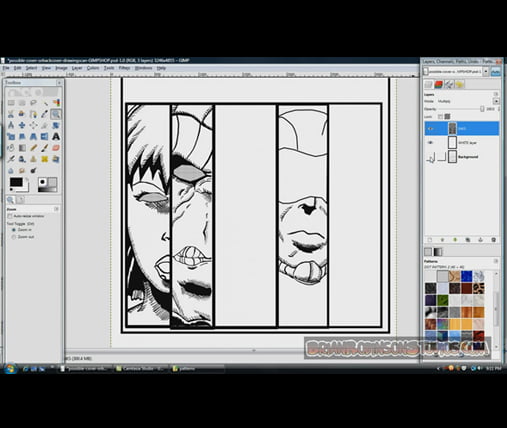
Gimp is an opensource money saving alternative developed by Scott Moschella. It’s a downloadable photo and image editing software program for those of us that can’t afford up to seven hundred dollars or more to buy a commercial program like Adobe Photoshop. We now have the same image manipulation power at our fingertips as the high-priced, closed-source programs.
It incorporates support of 16 and 32-bit color, a highly intuitive user-interface, a huge array of filters and dynamic brushes and leading-edge advanced tools that amateur and pro photographers, Web designers or power users and professionals demand in high-end, high-priced photo and image editing programs.
An important feature is the capability of Import and Export your images in a wide range of common file formats like: JPEG, GIF, PNG, and TIFF, to special use formats such as multi-resolution and multi-depth files.
For the Microsoft version, it uses a plug-in called Deweirdifyer to combine the application’s numerous windows in a similar manner to the MDI system used by most Windows graphics packages. This essentially adds a unifying background window that fully contains the entire UI. Although all features in Photoshop are not available in Gimp, more compatibility with Photoshop can be achieved using a third-party add-on for GIMP that supports Photoshop plug-ins, called pspi, which runs on Microsoft or Linux.
Features
- Full suite of painting tools including brushes, a pencil, an airbrush, cloning, etc.
- Tile-based memory management so image size is limited only by available disk space
- Sub-pixel sampling for all paint tools for high-quality anti-aliasing
- Full Alpha channel support
- Layers and channels
- A procedural database for calling internal GIMP functions from external programs, such as Script-Fu
- Advanced scripting capabilities
- Multiple undo/redo (limited only by disk space)
- Transformation tools including rotate, scale, shear and flip
- File formats supported include GIF, JPEG, PNG, XPM, TIFF, TGA, MPEG, PS, PDF, PCX, BMP and many others
- Selection tools including rectangle, ellipse, free, fuzzy, bezier and intelligent
- Plug-ins that allow for the easy addition of new file formats and new effect filters
It also has a useful help library and full tutorial section has been built-in to Gimp, so you are always just a couple of clicks away from step-by-step guidance of photo and image editing techniques.
Download from: http://www.gimp.org/
Support Group: https://discourse.gnome.org/tag/gimp