
🔍 The File Search Tool That Makes Windows Search Look Like a Snail
Let’s be real – Windows’ built-in file search feels like trying to find a specific noodle in a bowl of spaghetti. Slow, clunky, and weirdly unpredictable. Even in Windows 11, sometimes it doesn’t return results at all; even when looking up frequently-accessed files.
Enter Everything by Voidtools. This tiny freeware app might just be the most underrated productivity booster for Windows users. It’s lightning-fast, dead simple to use, and once you try it, there’s no going back.
If you’ve ever screamed at your PC because you know you saved that file somewhere but can’t find it, then Everything is your new best friend.
⚡ What Is Everything?
Everything is a desktop search utility for Windows that indexes your entire file system in seconds and lets you find anything instantly. As in, real-time-as-you-type instantly.
It’s free, lightweight, and quietly brilliant. Unlike Windows Search, which takes its sweet time and sometimes insists that files don’t exist when they very clearly do, Everything delivers exactly what you’re looking for as you type – whether it’s a file, folder, or partial filename.
And it doesn’t matter if the file is buried ten folders deep or stored on another drive, Everything sees it all.
💡 Key Features That Make Everything So… Well, Everything
1. Ridiculously Fast Search
We’re talking milliseconds. Everything builds an index of your entire file system when it launches, and after that, it updates in real time. You’ll find what you’re looking for faster than you can say “Where did I save that spreadsheet?”
2. Minimalist Interface, Maximum Speed
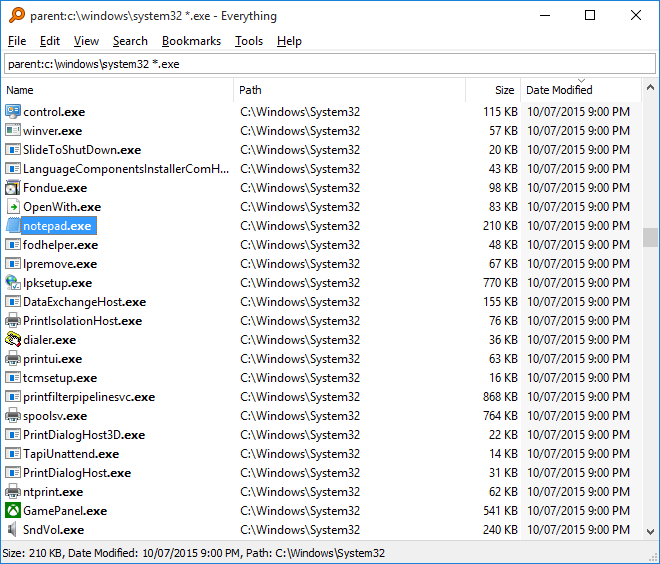
Open it up and you’re greeted with a simple search bar and a list of results. No bloat, no ads, no tabs trying to be clever. It’s clean, focused, and very much to the point.
3. Instant Wildcards and Filters
Looking for all the PDFs you created last month? Or files with “budget” in the name? Or maybe everything larger than 500MB? You can filter, sort, and refine with wildcards, regex, or the friendly search toolbar. It’s like Google Search, but for your own hard drive.
4. Real-Time Indexing
Unlike other search tools, Everything doesn’t need to be re-run every time you update your files. The index is always current. If you rename, move, delete, or create a file — Everything knows. Immediately.
5. Advanced Search for Power Users
You can search by:
- File type
- Modification date
- File size
- Folder location
- Regex pattern
And if you don’t want to learn all the syntax, the Search > Advanced Search window makes it point-and-click easy.
6. Tiny Footprint
The installer is just a couple of megabytes. It barely sips system resources. You could run this thing on a potato with a USB stick for RAM and it would still feel fast.
🔒 Is It Safe?
Yes. Everything is read-only by default. It doesn’t change your files, just looks at them. It also doesn’t index file contents (only names and paths), which makes it faster and avoids privacy concerns.
And best of all, it’s completely ad-free and doesn’t collect your data; Just a straightforward tool built by people who respect your time and privacy.
🧪 Who Is It For?
- Students & Researchers – Quickly dig through notes, PDFs, or research papers saved in chaotic folder structures.
- Developers & Sysadmins – Instantly find logs, config files, or entire project folders without clicking through endless directories.
- Content Creators – Easily locate assets, drafts, and backups across drives and folders.
- Casual Users – If you’ve ever typed “where did I save that file?” into Google, this is your fix.
🤔 What It Doesn’t Do
- It doesn’t search inside file content. So you can’t search for words within documents – just their file names.
- It’s Windows-only. No Mac or Linux version (sorry penguin fans).
- And while it’s incredibly simple, power users may need to explore the documentation to unlock all its ninja-level tricks.
🧭 Final Verdict
Everything lives up to its name. It gives you everything you need to find files on your Windows machine instantly, with no bloat and no nonsense.
Once it’s on your system, it becomes one of those tools you forget is there – until the one time you use a computer without it and feel like you’ve traveled back to 2002.
It’s fast, it’s free, it’s feather-light, and it might just be the most useful little app you never knew you needed.
📦 Download It Now
Stop wasting time hunting through folders. Download Everything from the official site here:
👉 https://www.voidtools.com