
📋 Ditto Review: The Clipboard Manager You Didn’t Know You Needed (But Totally Do)
We’ve all done it: copied something important, only to accidentally overwrite it with something else a few seconds later. And then boom – gone forever into the void of the Windows clipboard. 😩
If that’s ever happened to you, meet Ditto. This humble clipboard manager turn your standard copy-paste workflow into a streamlined, searchable, memory-boosted experience. And the best part? It’s lightweight, free, open-source, and once you start using it, you’ll never want to go back.
—–
🧠 What Is Ditto?
Ditto is a clipboard manager for Windows that keeps track of everything you copy – not just the last item. Whether it’s text, images, files, or rich text formatting, Ditto remembers it all and stores your clipboard history so you can reuse or re-paste anything you’ve copied… even if it was 2 hours (or 2 weeks) ago.
It runs quietly in your system tray and springs to life with a simple keyboard shortcut. It’s one of those apps that stays out of your way but is always ready when you need it.
🔥 Top Features That Make Ditto Incredibly Useful
1. Clipboard History at Your Fingertips
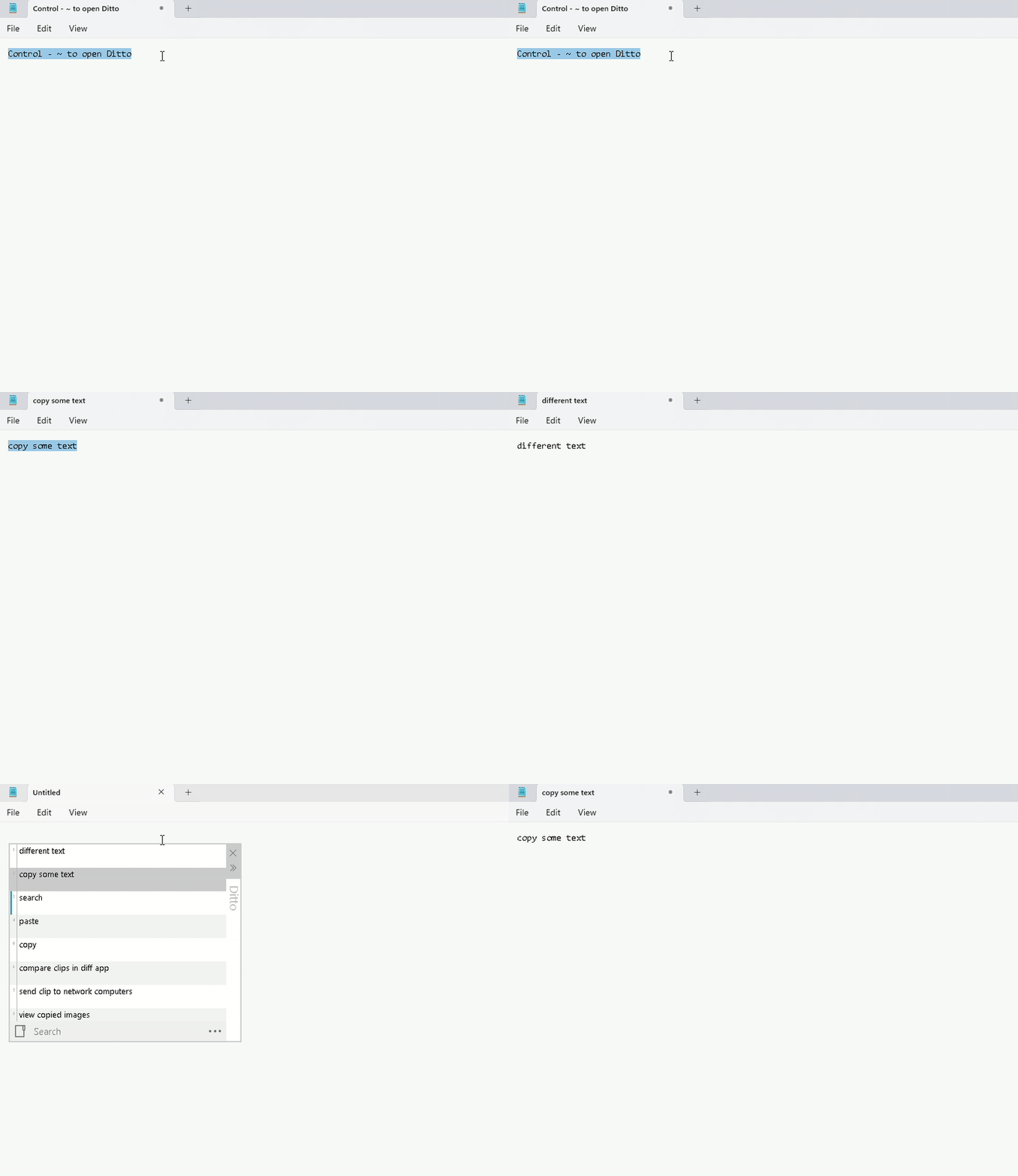
Ditto saves a history of your copied items – text, images, file paths, HTML content, and more – and makes it super easy to retrieve them later. Want to paste something you copied 30 items ago? Ditto’s got your back.
2. Fast Search
Just hit Ctrl + (or your chosen hotkey) and start typing. Ditto filters your clipboard history as you type, so finding that code snippet, quote, or image from earlier is near-instant.
3. Persistent Storage
Unlike the regular Windows clipboard that vanishes when you reboot, Ditto stores your history even after a restart. You can also configure how many items to keep (default is 500, but crank it up if you’re a copy-paste machine).
4. Paste With Style
Each entry in Ditto retains its original format. That means if you copied styled text, hyperlinks, or even formatted Excel cells, it pastes exactly as expected.
And if you want to paste without formatting to keep things super clean? There’s a shortcut for that too.
5. Cross-Device Sync
Working across multiple Windows PCs? Ditto can sync your clipboard history over a local network or internet connection using encryption. Just imagine copying a URL on your laptop and pasting it on your desktop a second later.
6. Keyboard-Centric Workflow
You don’t have to touch your mouse. Use shortcuts to open Ditto, search, preview entries, and paste; all from your keyboard like a productivity ninja.
7. Preview and Customization
Ditto shows a quick preview of each item in your clipboard list. You can customize how much text to show, which formats to store, and how long to retain items. There’s even support for groups, filters, and special paste options.
🧪 Who Is Ditto For?
-
Writers & Editors: Store chunks of copy, quotes, and rewrites without juggling multiple documents.
-
Developers: Save code snippets, SQL queries, and terminal commands without opening a note app.
-
Designers: Copy color codes, file paths, and assets, with no more backtracking.
-
Students: Keep a running history of research notes and source citations while you work.
-
Everyone Else: If you’ve ever hit Ctrl+V and been disappointed, you’ll benefit from Ditto.
🤔 What It Doesn’t Do
-
No Rich UI: It’s functional, but don’t expect a beautiful, modern interface. Ditto’s strength is utility, not aesthetics.
-
Windows Only: Sadly, there’s no official version for macOS or Linux.
-
Slight Learning Curve: While it’s simple to start, unlocking its full power takes a bit of exploration. But once you get it… it’s smooth sailing.
🔒 Lightweight and Respectful
Ditto doesn’t phone home. It doesn’t track you. It doesn’t flash ads or push upgrades. It just sits there, quietly working hard to make your day easier. The app uses strong encryption for any shared data and stores everything locally by default.
Also worth noting: the app is completely free and open-source. No nagware, no subscriptions, no catch.
🧭 Final Verdict
Ditto is one of those unsung heroes of the Windows ecosystem. It’s a lightweight app that quietly supercharges your workflow. Once you’ve experienced the ability to search and recover your clipboard history, basic copy-paste will feel downright prehistoric.
Whether you’re deep in a creative project, slinging code, or just doing admin tasks, Ditto gives your clipboard a memory – and that’s something worth celebrating.
—–
📦 Download It Now
Ready to copy like a pro? Download Ditto from the official website here:
👉 https://ditto-cp.sourceforge.io